
Multithreaded downloads
Several files at once instead of one at a time. Set how many run in parallel so you can saturate your connection — or keep it polite.
Free · Open source · No account needed
CoomerDL is a desktop app for Windows that takes a link, figures out every file behind it, and downloads them all — in parallel, with retries, and without ever downloading the same file twice.
Windows 10 & 11 · No Python required · The button takes you to the GitHub release page — nothing downloads until you click it there.
Features
No paywalled core. The build on GitHub is the full downloader.
Several files at once instead of one at a time. Set how many run in parallel so you can saturate your connection — or keep it polite.
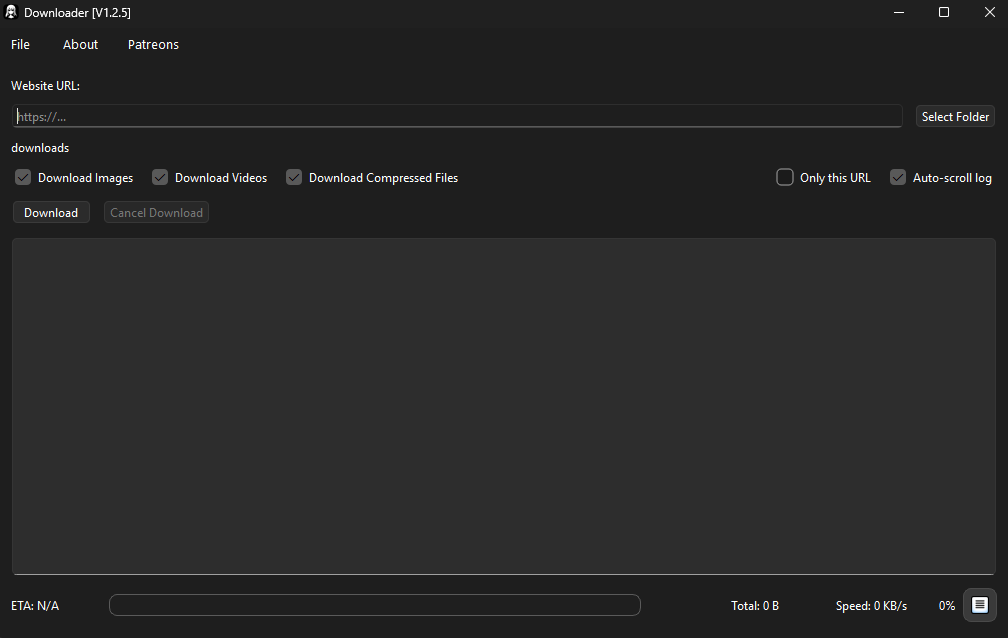
A global progress bar with the total downloaded, current speed and estimated time left, plus a live log of every file as it lands.
Dropped connections and server hiccups are retried on their own. A failed file doesn't stop the queue.
Every finished file is recorded in a local SQLite database. Re-run the same profile later and CoomerDL only grabs what is new.
Files land in subfolders by type — images, videos, documents, compressed — with naming rules you control.
Both languages ship in the app and are switchable from Settings. Extra translations can be added by the community.
Import your own cookies for sites that require a session (SimpCity), and export them again from the Settings panel.
Everything is logged and tagged by domain, so when something breaks you can export the log and report exactly what happened.
Built on PySide6 — a real desktop window with a settings panel, a searchable download history and no browser wrapper.
Supported sites
These sites go up and down constantly. This list mirrors the README of the repository — check GitHub for the current state.
Coomer alternative. Full profiles and individual posts.
Kemono alternative. Full profiles and individual posts.
Single albums and whole profiles.
All bunkr domains and mirrors.
Works once you import your session cookies in Settings → Cookies.
Currently blocking the downloader.
Currently blocking the downloader.
Downloads fail at the moment.
File types
Anything in these four groups is picked up and sorted into its own folder.
How it works
Launch CoomerDL. No sign-up, no license key, no account.
A profile, an album or a single post from any supported site.
Choose where everything should land. Subfolders are created for you.
Tick images, videos, compressed files — or all three. There's also "Only this URL" if you don't want it crawling a whole profile.
Watch the per-file bars fill up. Close it and come back later; the database remembers what you already have.
Under the hood
Simultaneous download limit, retry behaviour, file naming mode and the folder structure that gets created.
Import and export session cookies for SimpCity, managed from inside the app.
Your download history grouped by user and post — searchable, exportable and deletable.
Domain-tagged log files, written to resources/config/logs/ by default.
English and Spanish out of the box; community translations by copying en.json.
Companion command-line tools — a Coomer CLI and a SimpCity CLI — for scripted use.
Install
A ready-to-run build for Windows 10 and 11. Nothing else to install — no Python, no dependencies.
The file is hosted on GitHub Releases, next to the changelog and the source it was built from. This site never serves you a binary of its own.
Open the latest release on GitHubLatest build on GitHub Releases
Needs Python 3.10 or newer. Works anywhere Python and Qt do.
git clone https://github.com/Emy69/CoomerDL.git
cd CoomerDL
python -m venv .venv
.venv\Scripts\Activate.ps1
pip install -r requirements.txt
python main.py
Dependencies: PySide6 · requests · beautifulsoup4 · cloudscraper
FAQ
Yes. The whole downloader lives on GitHub and you can read, build and modify the source. There is a Patreon, but it funds the work — it does not unlock the app.
The prebuilt release is Windows only (10 and 11). The source is Python and Qt, so running it elsewhere is possible, but it is not officially supported or tested.
These sites change their layout or start blocking automated requests without warning. When that happens the fix has to be written into the downloader. The supported-sites list on GitHub is always the current truth.
The build is not code-signed, so SmartScreen warns about it like it does for most small independent apps. If that bothers you, run it from source instead — the code is public.
No. Every completed file is recorded in a local SQLite database, so a second run on the same profile only fetches what appeared since.
Export the log from the app — entries are tagged by domain — and open an issue on GitHub or drop it in the Discord.
Yes. Copy en.json, translate only the values (leave keys and placeholders untouched), register it in languages.json and open a pull request.